Chrome extension for Instagram

Find the posts that win, on any creator’s account.

Sort any profile by what actually performed, put your own posts next to theirs, and let Analyse break down the winning reels: hook, structure, message. You’ll know what to post next.

  • Free plan, no card
  • Never asks for your Instagram password
  • Profiles, Explore and Saved
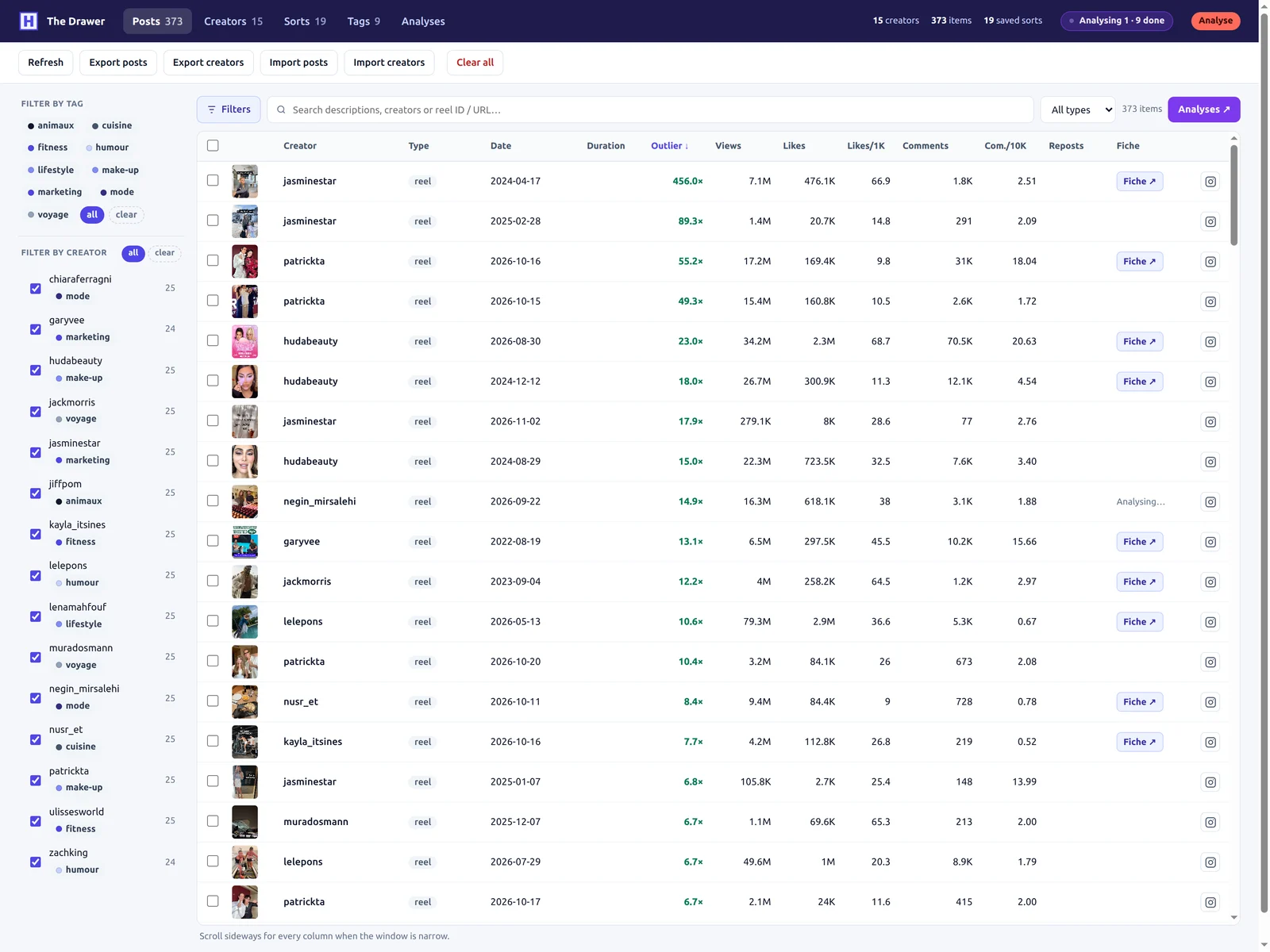
An Instagram profile sorted by outlier score, with a reel analysis on top

From scrolling to your next reel, in three steps

  1. 1

    Sort

    Open any profile and pick a metric: views, likes, comments or outlier score. The grid re-ranks right inside Instagram.

    Free
  2. 2

    Compare

    Every sort lands in your Drawer. Sort your own profile too and set your posts against theirs, metric by metric.

    Free
  3. 3

    Analyse

    Pick the reels worth studying. Each one becomes an analysis: what works, and why.

    Analyse
Sort

The best posts of any account, in two seconds

Instagram shows posts by date. Head of Content ranks them by results. Pick a metric and the grid re-orders in place, without leaving Instagram: the posts that over-performed rise to the top, and you see at a glance which formats and topics carry the account.

  • Sort by views, likes, comments or outlier score Free
  • The outlier score shows how many times better than usual a post did, so a small account and a star compare fairly Free
  • Works on profiles, Explore and your Saved collections Free
  • Filter by threshold (say, over 100K views) and copy the ranking Free
  • Go back through the account’s whole history, filtered by period Pro

Free covers the latest 25 posts or the last week of any account.

Compare

Then put them next to yours

Everything you sort is filed in the Drawer, your research library. Sort your own profile too: your posts sit next to the creators you follow, in the same columns. You see right away where the gap is: format, length, topic, engagement.

  • Likes per 1,000 views and comments per 10,000: engagement you can compare across accounts of any size Free
  • Reels, photos and carousels, with caption, audio and duration Free
  • Tag creators (clients, competitors, inspiration) and filter in one click Free
  • Export to CSV, Excel or JSON for your reports Free
  • Bulk actions on a selection: media, thumbnails, comments, transcripts Pro
The Drawer: your posts and other creators’ posts in one table
Analyse

Save and decode every reel you come across

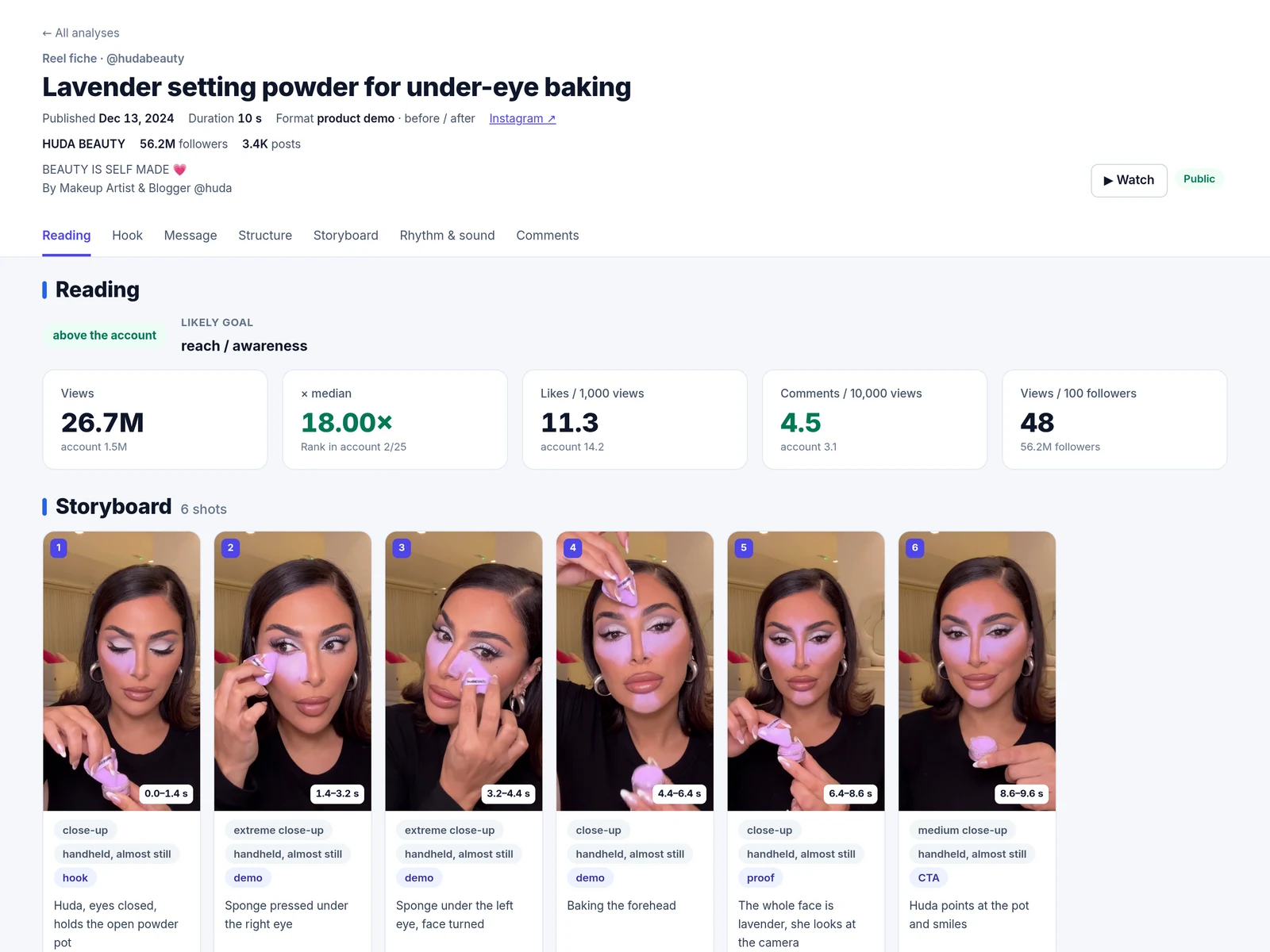
Select reels in your Drawer and Analyse watches them for you. It reads the video itself, not just the numbers, and crosses it with the stats and the comments. Each reel becomes a clear analysis; several reels become a report that shows what the winners have in common.

A reel analysis: hook, storyboard and performance

The reel analysis

  • The hook: what’s said, shown and written in the first seconds, and why it grabs
  • The shot-by-shot storyboard, the rhythm and the sound
  • The message, the promise and the call to action
  • What the comments ask for, turned into content ideas
  • Performance against the account’s own median
  • Read on headofcontent.app, share by link, export to Markdown
  • LLM connector: let your AI assistant read your analyses
  • Written in your language, English or French
See the Analyse plan

Included in Pro: an analysis costs 10 to 30 credits depending on the reel’s length. Pro has 500 credits a month, Analyse 5000.

Inspect

Everything you need to take a post apart

From reel to script

Transcribe any reel in one click from the player and keep the text, to study its structure or reuse it. 1 credit per minute.

Pro

Every stat of a post

Click a post to open it full screen: views, likes, shares, saves and reposts, Instagram and Facebook figures split, full caption and comments.

Free

A real video player

Jump 5 seconds, seek to the exact timestamp, keep your volume between reels: made for rewatching a hook frame by frame.

Free

Tabs that name themselves

Instagram calls every tab “Instagram”. Each one takes the account’s name instead, so fifteen research tabs stay readable.

Free

Made for people who post for a living

Creators

You post for your own account

  • Spot the formats that work in your niche before you shoot
  • Compare your reels with accounts like yours, metric by metric
  • Turn the best reels into analyses and a list of ideas
Social media managers

You run accounts for others

  • Audit a client and their competitors in minutes
  • Keep all your research filed by client, with tags
  • Hand over clean exports and analyses, ready to present
Pricing

Free to start

Pro to dig through whole accounts and understand why a reel works. Analyse for heavy volumes.

Free

To see what works

$0forever
Add to Chrome
  • Sort the latest 25 posts or the last week
  • Every metric, outlier score included
  • Post inspector and video player
  • The Drawer, CSV / Excel / JSON exports

Pro

To dig through accounts and analyse reels

$9.99/ month

Billed yearly ($119.88), or $15 month to month.

Start the 14-day trial
  • Everything in Free
  • The whole history, with date filters
  • Bulk media, thumbnails, comments and transcripts
  • 500 credits a month (1 credit = 1 min of transcription)
  • Reel analyses & LLM connector

Compare the plans

Plan comparison
FeatureFreeProAnalyse
Sort and discover
Sort profiles, Explore and Saved by views, likes or commentsLatest 25 posts or last weekWhole history
Outlier scoreIncludedIncluded
Metric filters and copy of the rankingIncludedIncluded
Date filterNot includedIncluded
Inspect a post
Full-screen inspector: Instagram and Facebook stats, caption, commentsIncludedIncluded
Video player: ±5 s, exact timestamps, saved volumeIncludedIncluded
Save a single post’s mediaIncludedIncluded
Reel transcriptionNot included500 credits / month · 1 per min
The Drawer, your library
Every sort filed automatically: reels, photos, carouselsIncludedIncluded
Engagement ratios, creator tags, filters and searchIncludedIncluded
CSV, Excel and JSON exportsIncludedIncluded
Bulk media and thumbnails on a selectionNot includedIncluded
Bulk comments (up to 100 per post)Not includedIncluded
Bulk transcripts and exports with transcriptsNot includedIncluded
Reel analysis
Reel analyses: hook, storyboard, message, CTA, comments, performanceNot included10–30 credits each
LLM connector (MCP) for your AI assistantNot includedIncluded
Account
Free trialNo time limit14 days
Priority supportNot includedIncluded

Questions

Is it safe for my Instagram account?

Head of Content only reads what Instagram already sends to your browser to display the page. It never asks for your Instagram password, and never posts, likes or follows on your behalf.

What is the outlier score?

It tells you how many times better than usual a post did. We divide the post’s result by the median of the account’s recent posts: ×1 is a normal post, ×5 is a hit. That is how a 10K-follower account and a 1M-follower account become comparable.

What do I get for free?

Sorting on the latest 25 posts or the last week of any account, every metric including the outlier score, the post inspector and the video player, the Drawer library and CSV, Excel and JSON exports. No time limit, no card.

What does Pro add?

The whole history of any account with date filters, bulk actions in the Drawer (media, thumbnails, comments, transcripts), 500 credits a month with no API key to set up, reel analyses and the LLM connector. Pro starts with a 14-day free trial.

How do credits work?

Pro comes with 500 credits a month, Analyse with 5000, shared by transcription and analyses. 1 credit = 1 minute of transcription. A reel analysis costs 10 credits for a reel up to 1 minute, 20 up to 3 minutes and 30 up to 5 minutes. Re-opening an analysis you already have is free, and the wallet refills every month.

What is in a reel analysis?

The hook (what is said, shown and written in the first seconds, and why it grabs), the message and its promise, the shot-by-shot storyboard, rhythm and sound, on-screen text, the call to action, what the comments ask for, the transcript, and the reel’s performance against the account’s median.

Can I analyse any account’s reels?

Yes. Any reel saved in your Drawer can be analysed, yours or another creator’s. Analyses and reports are written in your language.

How does sign-in work?

Enter your email in the extension popup and we send you a link. Opening it signs you in and connects the extension automatically. No password anywhere.

Where is my data stored?

The Drawer (tags, filters, saved sorts) lives in your browser. When you are signed in, a copy of each sort (post stats, captions, comments) and of the thumbnails is kept on our servers to power your history and analyses. Details in the privacy policy.

Can I cancel?

Anytime, from the billing portal linked in the extension popup. You keep your plan until the end of the period you paid for.

Does it work on TikTok or YouTube?

No. Head of Content is Instagram only, on purpose: one platform, done properly.

Your next reel idea is already on Instagram.

Install the extension, open a profile, sort. It takes ten seconds.

Add to Chrome, it’s free